![Optii Logo 3x (2)-3.png]](https://help.optiisolutions.com/hs-fs/hubfs/Optii%20Logo%203x%20(2)-3.png?height=40&name=Optii%20Logo%203x%20(2)-3.png)
Coordinators assign the day's jobs at opening. Through the day, jobs get cancelled — a supervisor removes one, the PMS flips a room to Inspected, a back-to-back turnover is detected, a room goes out of order. Until now the job simply vanished from the attendant's list with no trace, and there was no way to tell the difference between a job they finished, a job reassigned to someone else, and a job cancelled outright.
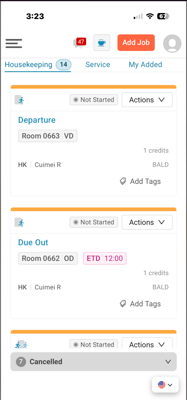
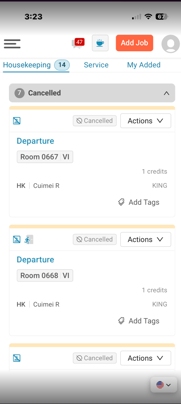
Housekeeping jobs cancelled during the operating day now appear in a collapsed cancelled group in My Jobs, so an attendant can account for work that left their list.
Key Capabilities
- A cancelled group is added to My Jobs, positioned after the existing groups and collapsed by default, with its own count. It only renders when at least one qualifying cancelled job exists.
- A cancelled job qualifies when it is a housekeeping job, scheduled for the current operating day, was assigned to the user or their squad or added by the user, was cancelled after that assignment, and was cancelled during the operating day.
- Cancelled jobs are excluded from the assigned job count, the credit total, and Jobs by Action. The cancelled group count is calculated separately.
- When a job is cancelled, the assigned count and credit total decrease and the group count increases without requiring a page refresh.
- Applies to My Assigned Jobs, My Added Jobs and My Squad Jobs, on web and mobile.
 .
. 
Current Limitations
- Jobs cancelled by the Daily Job Creation batch are excluded by design, so the group reflects mid-day operational changes rather than overnight housekeeping.
- Prior-day cancellations are excluded. Only the current operating day is shown.
- Jobs cancelled before being assigned to the user are excluded, as are jobs cancelled after being reassigned away from the user.
- Service jobs are out of scope. An attendant holding both types will see cancelled housekeeping cards while cancelled service cards continue to disappear silently on the same screen.
- Cancelled jobs remain read-only — no job actions, and no cancellation reason, cause, or actor on the card. The reason remains available in the Activity Log. Existing behaviour, unchanged.
- Where a cancellation produces a replacement job, both are displayed. No de-duplication or linking between them.
- No notifications. The in-view group is the only signal the attendant receives.
- Inherits the existing condition that the My Jobs housekeeping section only renders when the user is on the Timeline for that date (OPV3-946).
- Status View, Supervisor View and Daily Roster are unchanged. Supervisor View and Daily Roster continue to retain prior-day cancelled jobs after DJC (OPV3-3547) — not addressed here.
- Housekeeping List View is out of scope and will be raised as a follow-up after OPV3-4467 lands
💡Tip: Feel free to share this valuable resource with your colleagues to explore Optii.
Would you like to learn more?
If you would like to learn more about Optii, please check out our Optii learning centre today at help.optiisolutions.com
Have questions or need help?
Do you have any questions about Optii? Please contact your success manager today at help@optiisolutions.com