![Optii Logo 3x (2)-3.png]](https://help.optiisolutions.com/hs-fs/hubfs/Optii%20Logo%203x%20(2)-3.png?height=40&name=Optii%20Logo%203x%20(2)-3.png)
🛑 What is the Opera On-Premise Hosted Integration queue removal limitation?
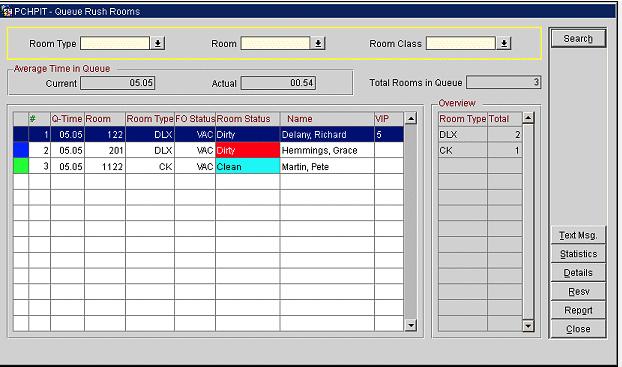
For properties utilizing an Opera On-Premise system via a Hosted Integration, there is a technical limitation regarding room status updates. When a room is removed from the queue within Opera, the system does not automatically transmit a status update to Optii.
Who is affected?
- Affected: Properties running Opera On-Premise (Hosted Integration).
- NOT Affected: Properties running standard Opera On-Premise (Direct) or Opera Cloud (OHIP). These integrations sync queue status changes seamlessly and automatically.
Frequently asked questions
Q: What exactly happens when a room is removed from the queue in Opera? A: In a standard setup, removing a room from the queue tells Optii to adjust the room's priority or status accordingly. However, under the Hosted Integration, Opera does not send this specific outbound trigger message to Optii. As a result, Optii remains unaware that the room was removed from the Opera queue and the room remains in rush status.
Q: Does this affect rooms that are added to the queue? A: No. This limitation strictly applies only to the action of removing a room from the queue.
Q: Is there any impact if our property uses Opera Cloud (OHIP)? A: None at all. This is an architecture-specific limitation unique only to the Hosted Integration with the On-Premise version of Opera. Opera Cloud (OHIP) works perfectly.
How should dispatchers handle queue removal when using the Hosted Integration?
If your property relies on the Opera On-Premise Hosted Integration, housekeeping dispatchers should use the following operational practices:
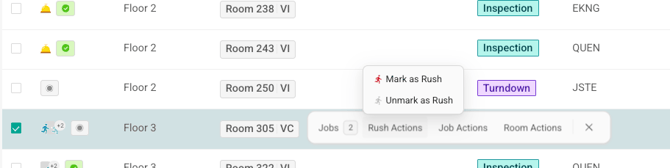
- Manual Updates in Optii: When manually taking a room off the queue in Opera, dispatchers should simultaneously update the room's status or priority directly within the Optii Housekeeping List View or Timeline. To learn more about job actions in Optii click here.

- Establish Team Protocols: Ensure your front desk and housekeeping coordination teams have a clear communication channel when a room's queue status changes unexpectedly, preventing unneeded rush cleans.
Need help identifying your specific Opera integration type? Contact your Optii Account Manager or Support team for assistance.
Share this article with team members who manage Opera On-Premise Hosted Integration properties.
Would you like to learn more?
If you would like to learn more about Optii, please check out our Optii learning centre today at help.optiisolutions.comHave questions or need help?
Do you have any questions about Optii? Please contact your success manager today at help@optiisolutions.com