![Optii Logo 3x (2)-3.png]](https://help.optiisolutions.com/hs-fs/hubfs/Optii%20Logo%203x%20(2)-3.png?height=40&name=Optii%20Logo%203x%20(2)-3.png)
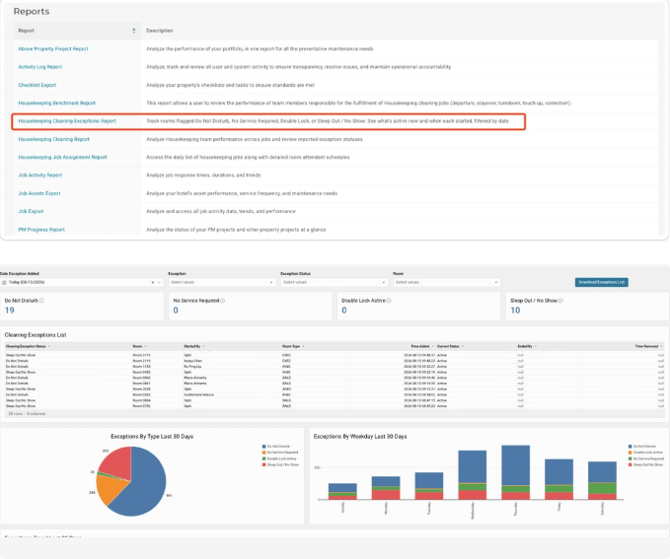
The Housekeeping Cleaning Exception Report is a new, dedicated report in Optii that replaces the exception tab previously embedded in the Housekeeping Cleaning Report. It gives housekeeping leadership a focused, fast-loading view of all rooms that could not be serviced.
The Housekeeping Cleaning Report had grown into a multi-purpose report answering several unrelated questions at once, which made it slow to generate and hard to read. Splitting exceptions into a focused, single-purpose report gives housekeeping leadership a direct view of rooms that could not be serviced, and improves load performance for both reports.
Key Capabilities
- Standalone report — found under Reports → Housekeeping → Housekeeping Cleaning Exception Report.
- Covers all four exception statuses: Do Not Disturb (DND), No Service Required, Double Lock Active, and Sleep-Out / No-Show.
- Room-level detail showing exception type, time added, time removed, and the team member who applied it.
- Improved generation time compared with the previous embedded exception tab.
Current Limitations
- The exception view has been removed from the Housekeeping Cleaning Report.
- Permissions are inherited from the History Cleaning Report. Any user with access to the History Cleaning Report will automatically have access to the Cleaning Exception Report (available from version 3.28.14).
- The historical date range available in this report is yet to be confirmed. This article will be updated when that information is available.
💡 Tip: Share this article with colleagues who manage housekeeping operations in Optii.
Would you like to learn more?
To learn more about Optii, visit our learning centre at help.optiisolutions.com
Have questions or need help?
Do you have any questions about Optii? Please contact your success manager today at help@optiisolutions.com