![Optii Logo 3x (2)-3.png]](https://help.optiisolutions.com/hs-fs/hubfs/Optii%20Logo%203x%20(2)-3.png?height=40&name=Optii%20Logo%203x%20(2)-3.png)
Why Inline Translations Matter
Optii Service supports multiple languages, allowing team members to communicate more effectively in their preferred language. With inline translations, you can type a message in your own language, and your team member will receive it in theirs—automatically. This reduces confusion, increases clarity, and helps create a more inclusive workplace.
Where Can I Use Inline Translations?
Inline translations are available on both the Optii Service desktop app and the Optii Service mobile app, so you can stay connected whether you’re at your desk or on the go.
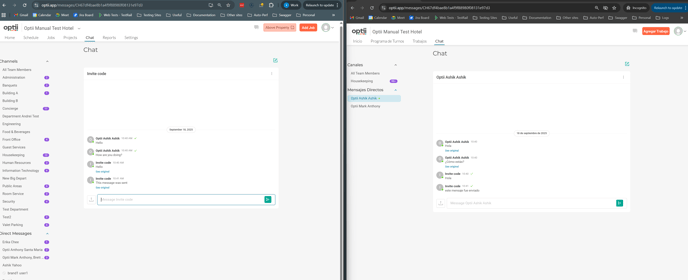
Setting Up Inline Translations in Optii Service
Follow these simple steps to enable and use inline translations:
-
Open Optii Service and Navigate to Settings
-
Log in to your Optii Service account. You must have administrator or manager permissions to edit user language settings.
-
Go to the Settings section.
-
-
Set Language Preferences for Each Team Member
-
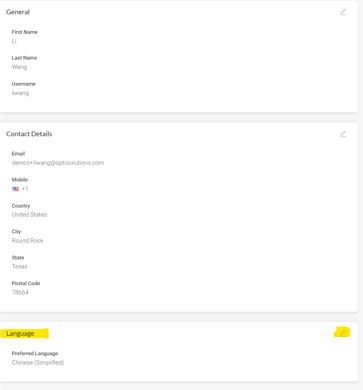
In the Users tab, select a team member’s profile.
-
Set their preferred language from the available options. For a full list of supported languages, refer to your Optii Service account settings or contact Optii support.
-
-
Start Chatting with Your Team
-
Go to the Chat tab.
-
Start a conversation with a team member.
-
Once this is set up, messages you send will be automatically translated based on the recipient’s language preference.
For example:
-
If you write a message in English and your team member's profile is set to Spanish, they will receive it in Spanish.
-
The same applies in reverse—messages from your team member are translated into your preferred language based on your own profile setting.
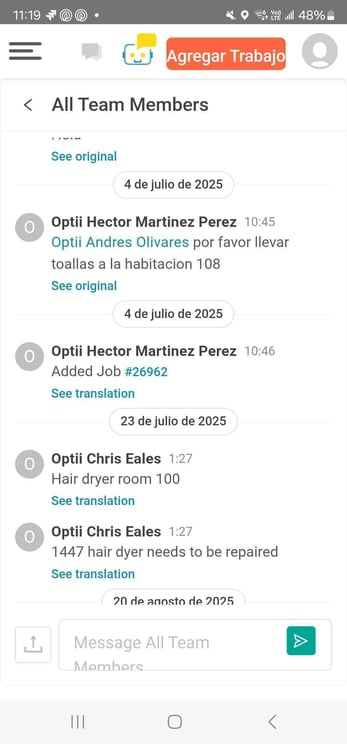
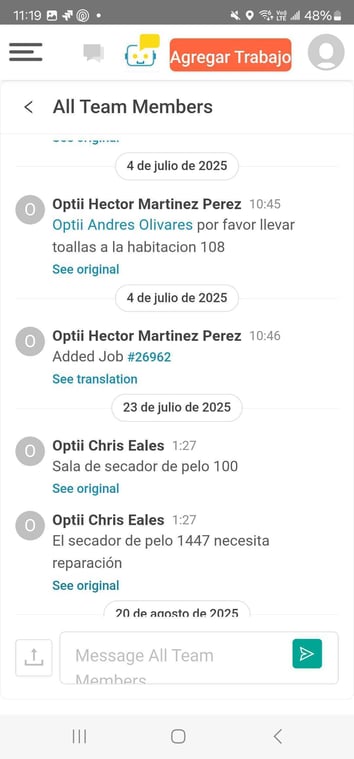
Inline translation in Optii Service helps your team communicate clearly across languages—automatically and in real time. Set it up in minutes and ensure everyone stays informed, regardless of the language they speak.