![Optii Logo 3x (2)-3.png]](https://help.optiisolutions.com/hs-fs/hubfs/Optii%20Logo%203x%20(2)-3.png?height=40&name=Optii%20Logo%203x%20(2)-3.png)
Optii has upgraded the Rooms Drawer to deliver comprehensive real-time visibility across all property guest rooms. With direct integration to your Property Management System (PMS), managers and coordinators can monitor live room statuses, review detailed guest reservation data, track Out-of-Order / Out-of-Service (OO/OS) schedules, and manage job actions directly without navigating away from the rooms overview.
Key Features & Operational Capabilities
1. Expanded Metadata Columns & Advanced Filtering
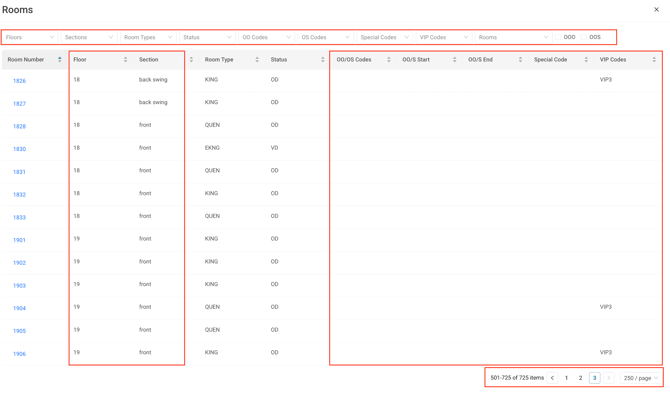
In addition to standard room details (Room Number, Room Type, and Status), the Rooms Drawer now includes expanded metadata headers and top-level filter controls:
- Floor & Section: Filter and sort rooms by physical floor levels and assigned house section zones (e.g., front, back).
- OO / OS Codes & Schedules: Track Out-of-Order and Out-of-Service codes (e.g., OTH) along with exact start and end date ranges.
- VIP & Special Codes: Instantly identify guest VIP tiers (e.g., VIP3) and special request indicators (e.g., B5, VC) across all rooms.
- Pagination Controls: The list view defaults to displaying up to 250 rows per page. For properties with over 250 rooms or jobs, navigate using the pagination arrows at the bottom-right of the screen to move through subsequent pages.
2. Direct Job Management & Field Updates
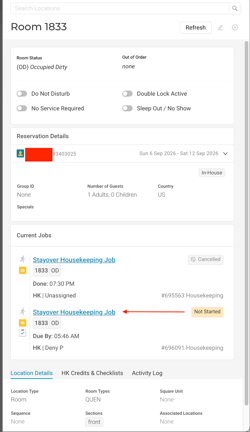
Under the Current Jobs section within any room panel, users can oversee all active, scheduled, completed, or canceled tasks associated with that room:
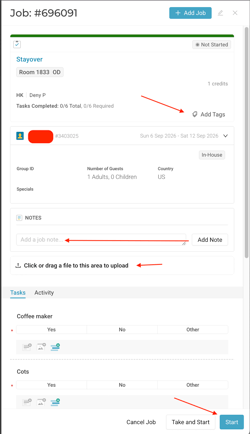
- Full Job Detail Access: Click on any job (e.g., Stayover Housekeeping Job) to inspect scheduled completion times, assigned personnel, and job numbers.
- Job Lifecycle Controls: Directly start, end, or edit jobs straight from the room panel.
- Rich Documentation: Attach operational notes, custom tags, photos, and verification files directly to the job record.
Quick Reference Summary Table
| Feature | Location in Optii | Key Operational Function |
| Metadata Columns | Rooms Drawer Header Bar | Filter & sort by Floor, Section, OO/OS Codes, Start/End Dates, VIP, and Specials. |
| Pagination | Bottom-right of Rooms List | Supports high-volume properties with up to 250 rows/page and page navigation arrows. |
| Job Actions | Current Jobs Section | View job history, edit assignments, start/end tasks, and attach notes, tags, photos, & files. |
💡Tip: Feel free to share this valuable resource with your colleagues to explore Optii.
Would you like to learn more?
If you would like to learn more about Optii, please check out our Optii learning center today at help.optiisolutions.com
Have questions or need help?
Do you have any questions about Optii? Please contact your success manager today at help@optiisolutions.com