![Optii Logo 3x (2)-3.png]](https://help.optiisolutions.com/hs-fs/hubfs/Optii%20Logo%203x%20(2)-3.png?height=40&name=Optii%20Logo%203x%20(2)-3.png)
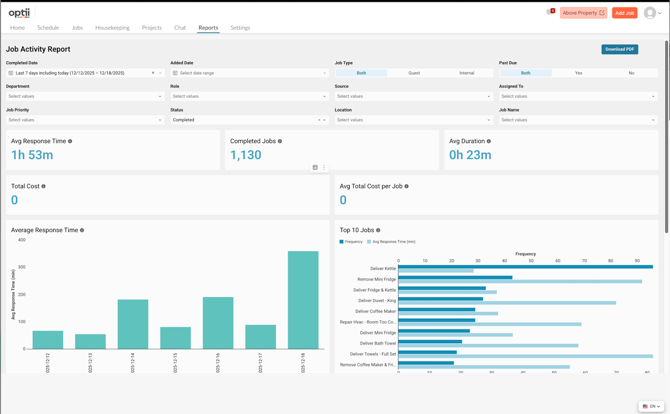
1. Vital Signs (Top KPIs)
-
Avg Response Time: Shows how long guests wait before a staff member completed the job requested.
-
Completed Jobs: Tracks the total volume of work your team handled during the period.
-
Avg Duration: Measures the actual "work time" taken to finish a job once it was started.
-
Total/Avg Cost: Monitors the labor and resource expenses associated with your service.
2. Daily Performance Check
-
The Trend Chart: Use the Average Response Time bar chart to identify specific days where service levels dropped (indicated by taller bars).
-
High-Volume Bottlenecks: Use the Top 10 Jobs chart to see which requests occur most often (Frequency) and which ones are taking too long to start.
-
Target Example: If "Deliver Towels" is frequent and slow, prioritize improving the towel delivery workflow.
3. Operational Audit (The Data Grid)
-
Individual Accountability: View the Assignee Name to see who performed the work and how long they took.
-
Precision Timing: The Wait and Response columns provide a clear $HH:MM:SS$ breakdown of guest wait times for every job ID.
-
Source Tracking: Determine if jobs are being created manually as "Standalone Jobs" or coming from other automated sources.
4. Pro-Tips for Managers
-
Filter by Past Due: Toggle the "Past Due" filter to Yes to instantly see every job that missed its target deadline.
-
Filter by Job Priority: Ensure your High priority guest requests always show a lower response time than Medium or Low priority tasks.
-
Daily Briefing: Pull this report every morning for the previous day to celebrate top performers and address service delays before they become trends.
Want to save time and have these insights delivered directly to your inbox?
We offer Automated Reporting based on your current subscription and invoice tier.
-
Custom Scheduling: Receive daily, weekly, or monthly summaries automatically.
-
Stakeholder Distribution: Ensure every department head sees the data they need without manual exports.
Interested in upgrading? Contact your Success Manager today for a personalized quote and a walkthrough of our automated reporting features.