![Optii Logo 3x (2)-3.png]](https://help.optiisolutions.com/hs-fs/hubfs/Optii%20Logo%203x%20(2)-3.png?height=40&name=Optii%20Logo%203x%20(2)-3.png)
Release Notes 3.23.0, Week of December 11th, 2025
We’re excited to introduce Optii 3.23.0! This release brings powerful new automation and control to your housekeeping operations, helping hotels streamline daily workflows, reduce manual effort, and improve accuracy across all teams.
- Linen Strip - Cancellation automation: Streamline Housekeeping by automatically cancelling redundant Linen Strip tasks.
- Check Task Creation on Clean status Upgrades. Prevent human error through improved validation when rooms are upgraded to “Clean.”
- Stayover Cadences by VIP code: Customise cleaning frequencies for VIP and Special Code guests.
- Inspection Automation on TD tasks: Ensure quality control through automated inspection creation.
- Stayover Inspection Cadence by VIP code: Manage inspection frequency for VIP/Special Code guests.
- OOO/OOS Drawer: Gain full visibility of Out of Order (OOO) and Out of Service (OOS) rooms directly in the Rooms Drawer.
- Credit Override on Room Location: Ability to override the room type credit and time value by individual room location
 Linen Strip Cancellation Automation
Overview
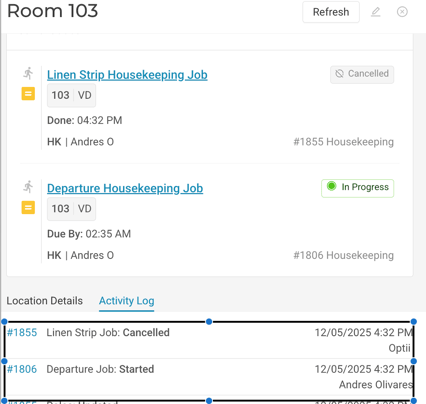
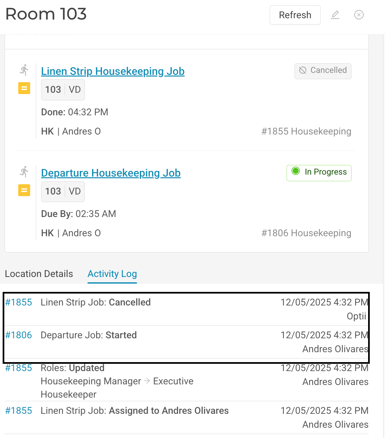
Optii now automatically cancels any incomplete Linen Strip tasks during the Daily Job Creation (DJC) process, allowing your team to focus on operations instead of manual task cleanup.
Additionally, when a user begins cleaning a room, any pending Linen Strip task for that room will be automatically cancelled—keeping your housekeeping workflow seamless and efficient.
Functionality
- Instantly cancels redundant Linen Strip tasks (no need to strip a room that’s already being cleaned)
- Prevents task carryover into the next day
- Protects tasks that contain notes, ensuring important information isn’t lost
Benefits
- Streamlined housekeeping operations
- Simplified task handling and management
 Check task creation on Clean Status Upgrades
Overview
We’ve enhanced the logic for Check Task creation to improve the accuracy of room status updates. Now, when a room is upgraded to “Clean” without being cleaned in Optii, an automatic Check Task will be created to verify the room’s true status.
Functionality
- If a Vacant Dirty room is upgraded to Clean without going through the cleaning process in Optii, the system will trigger a Check Task to confirm the room status.
Benefits
- Prevents human error
- Eliminates operational confusion
- Reinforces Optii as the single source of truth for room cleaning status
Stayover Cadences by VIP code
Overview
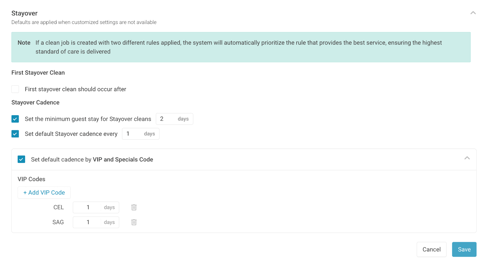
Automatically manage stayover cleaning frequencies using VIP and Special Codes. This feature gives you the flexibility to define unique stayover cadences for your VIP guests—beyond your standard property cadence.
Functionality
- Configure cleaning frequency separately for each VIP or Special Code
- Overrides the standard Stayover cleaning cadence
- A value of 0 prevents Stayover job creation for that guest type
Benefits
- Full control over service frequency for VIP and Special Code guests
- Reduced manual job management
- Improved guest personalisation
Inspection Automation on Turndown Jobs
Overview
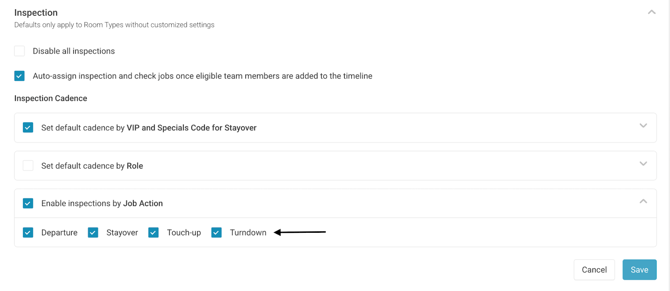
You can now configure Optii to automatically create an Inspection job upon completion of a Turndown (TD) job, ensuring consistent quality control and visibility into evening service.
 Functionality
- Choose whether an Inspection task should be triggered automatically upon completion of a TD task.
- Quality assurance
Benefits
- Strengthened quality assurance processes
- Automated, consistent inspection workflow
- Better visibility and control over Turndown operations
Stayover Inspection Cadence by VIP code
Overview
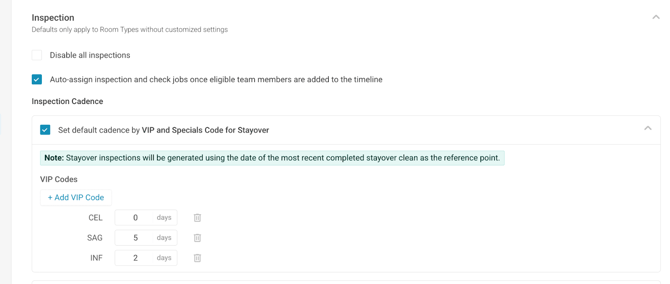
Take even more control over inspections by managing Stayover Inspection creation based on guest VIP or Special Codes. This allows you to create (or skip) inspections for specific guest profiles as needed.
Functionality
- Assign specific inspection frequencies by VIP or Special Code
- A value of 0 prevents inspection creation and automatically flips the room to “Inspected” status
- Configure cadence separately from normal inspection frequency
Benefits
- Personalise inspection routines for VIP and Special Code guests
- Streamline operations while maintaining flexibility
Rooms Drawer -OOO/OOS visibility
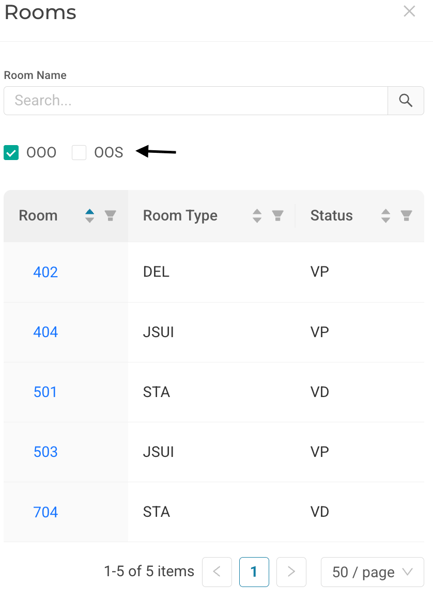
Gain full visibility of your Out of Order (OOO) and Out of Service (OOS) rooms directly within the Rooms Drawer in Optii. This gives teams instant awareness of OOO/OOS rooms while still seeing their current cleaning status.
Functionality
- View all rooms marked as OOO or OOS directly in the Rooms Drawer
- Filter the Rooms View by OOO or OOS to locate affected rooms easily
Benefits
- Improved visibility of OOO/OOS room status
- Better understanding of cleaning progress and readiness across all room types
Credit value override by room location
Overview
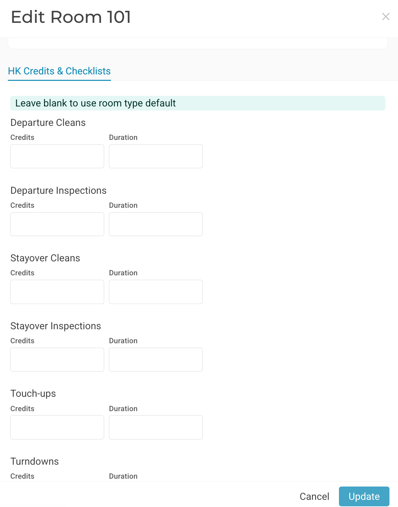
We’ve introduced the ability for users to override global room type credits with individual room-level settings. This enhancement allows you to be more strategic in allocating time per room, accommodating variations such as room size or layout within the same room type.
Functionality
- Set custom credit values by specific room number.
- Ideal for properties with rooms of varying sizes or complexities within the same room type
Benefits
- Greater control over housekeeping time allocation
- More accurate tracking of the room attendant workload
Would you like to learn more?