![Optii Logo 3x (2)-3.png]](https://help.optiisolutions.com/hs-fs/hubfs/Optii%20Logo%203x%20(2)-3.png?height=40&name=Optii%20Logo%203x%20(2)-3.png)
We’re excited to introduce Optii 3.24.0 — This release is all about giving Housekeeping its own clean, focused workspace—dedicated navigation, and adding even more functionalities to optimize hotels and their teams even more!
- Supervisor View
- Overview of the operation
- Housekeeping Rules
- Job Add-on enhancement
- Pick Up Handler
- Manage the Pick Up status
- Saved Filters Service
- Tags Enhancements
- New In-App AI Support Chat
- Optii will now provide an in-app tool on desktop to provide support and a tooltip.
- Bugs/Enhancements
 Supervisor View
Overview
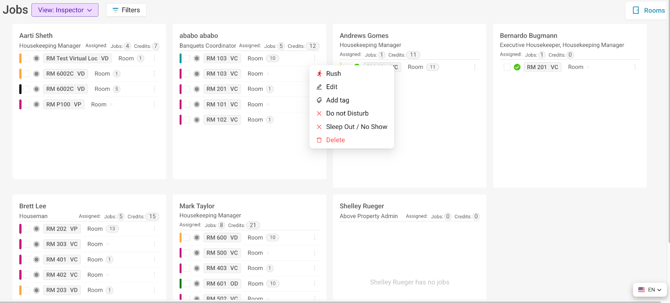
We’ve introduced a dedicated Inspector’s View designed specifically for Managers and Supervisors, providing clear oversight of inspections and room activity. It’s now easier to stay on top of your room attendants while having a holistic view of the operation
From this new tab, users can access everything they need for their day in one place:
- All Housekeeping jobs are assigned to users
- View and manage cleans, status updates, and workload
- View the number of credits or job tasks assigned
- Quick actions such as marking rooms DND, Rush, Add tags, and more!
Functionality
- Timeline-based view aligned with existing job logic
- Visibility into DNDs, Rush Rooms, Refuse Service, and more
- Role-based access permissions
- Advanced filtering by Location, Section, Role, or Team Member
Benefits
- Improved visibility for leadership
- Faster decision-making during daily operations
- Clear accountability across inspection workflows
 Housekeeping Rules - Job Add-on enhancements
Overview
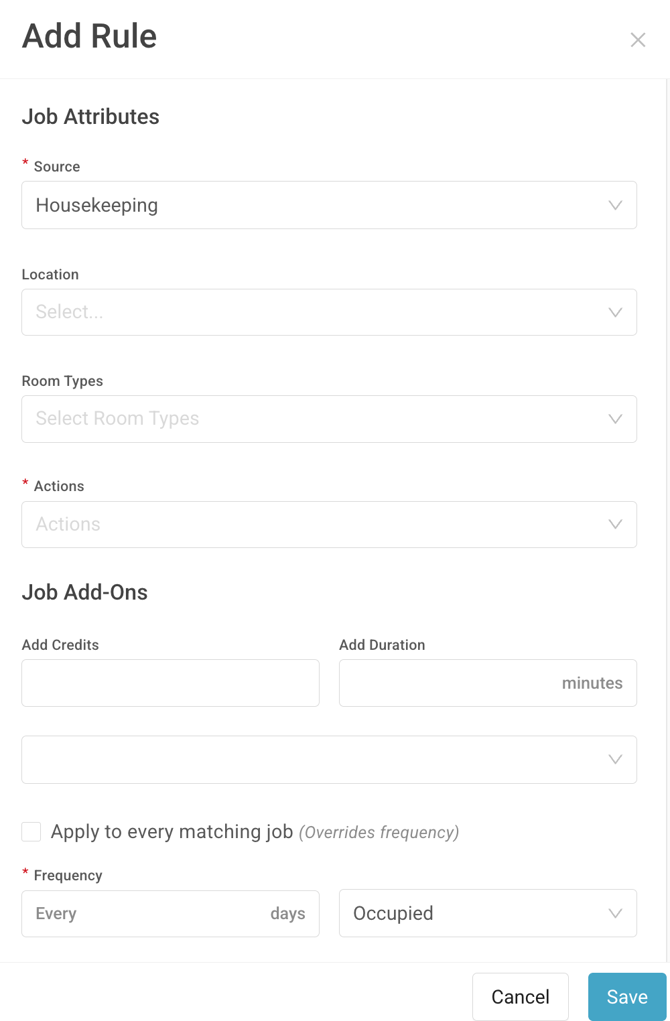
We’ve enhanced Housekeeping Rules to support more intelligent Job Add-on creation based on guest reservations. These rules now dynamically apply during a guest’s stay, ensuring the right add-on tasks are created at the right time—without manual effort.
Functionality
- Create Job Add-on rules tied directly to guest reservations
- Rules evaluate guest check-in date, length of stay, and configured frequency
- Add-on jobs are created on the next applicable day based on the rule logic
Benefits
- Automated enforcement of housekeeping standards
- Reduced manual task creation
- Consistent service delivery throughout a guest’s stay
Housekeeping - Edit/Add Permission detached
Overview
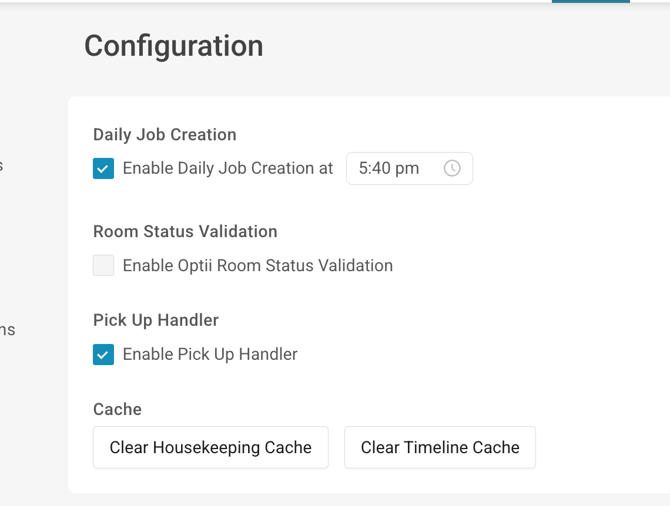
Pick Up status is now an optional configuration for properties. This allows teams to decide whether they want to include Pick Up as part of their operational workflow—without changing existing logic.
Functionality
- Enable or disable the Pick Up status at the property level
- Existing pick-up logic remains unchanged when enabled, the system will create a check task if the room needs revision, but Optii will allow the status updates as comes from the PMS
Benefits
- Greater flexibility to match property-specific workflows
- Control over operational complexity without disruption
- Especially for those properties that don’t use a Pick Up status
- The creation of check tasks continues to happen without the utilization of a PU status
Saved Filters (Service)
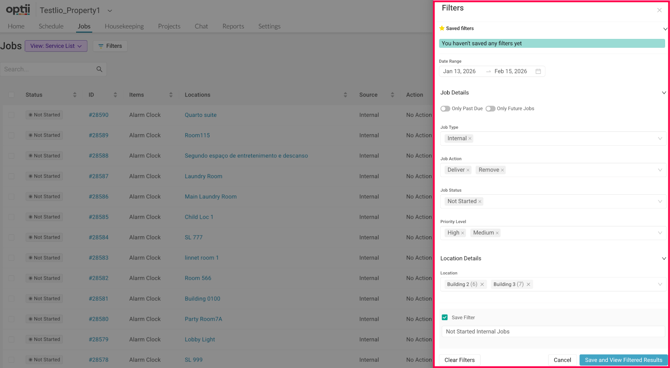
Overview - Saved Filters allow users to create and save custom filter combinations for jobs, making it easier to return to the views they use most often. Filters are tied to each user’s profile, persist across sessions, and can be applied across multiple views, helping users stay focused without repeatedly reapplying filters.
Functionality
- Profile-Based Saved Filters - Create and save multiple filter combinations directly to your user profile.
- Persistent Across Sessions - The last selected filter is retained even after logging out and back in.
- Works Across Views - Apply and switch saved filters across Status Page, My Jobs, and List View.
- Flexible Filtering Options - Filter by common job attributes such as date range, job type, action, status, priority, and location (availability may vary by view).
Benefits
- Reduces time spent repeatedly setting up the same filters.
- Enables personalized job views based on role, shift, or responsibilities.
- Helps teams quickly focus on relevant, high-priority, or upcoming work.
Custom Tags - Jobs and Job Cards
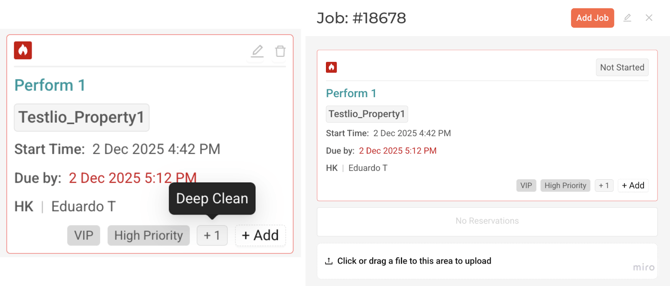
Overview - Job Card Tags make it easier to view and manage job context at a glance. Tags are now displayed directly on job cards, allowing users to quickly understand key details without opening the job. Users can also add or create tags directly from the job card at any point in the job lifecycle, eliminating the need to edit the job or navigate to tag management settings.
Functionality
- Tag Visibility on Job Cards - View assigned tags directly on job cards without opening the job.
- Add Tags Inline - Add existing tags directly from the job card.
- Create Tags on the Fly - Create new custom tags without navigating to tag management or editing the job.
- Instant Updates - Tags are immediately reflected on the job card.
Benefits
- Faster access to important job context
- Reduced clicks and simplified workflows
- Ability to add tags mid-job for categorization, escalation, or follow-up
- Improved visibility for priority and special handling
Enhancements & Bugs
-
Job Added Time Stamp
-
Optii now logs the start time upon successfully adding a job not at the time of selecting the add job
-
-
Optii AI Support
- Optii now provides a chat support agent and helpful tooltips throughout the platform to guide and support users.
- Activity Log Enhancement
- You are now able to see the job action associated with the job ID on the location activity log
- Bugs Addressed
- Addressed an Issue when unassigning jobs on the timeline intermittently we’re not assigned
- Addressed performance issues with the timeline module
- Addressed an issue when searching for a property on the property navigator search did not return exact matches
What if I have questions about all of this?
Your Optii Success Manager is awaiting your call — ask as many questions as you would like!
Call on:
- +1 855 398 1447 if you are located in North America, or
- +852 3008 0288 if you are located in Asia, or
- +44 20 3037 8851 if you are located in Europe, or
- +61 7 5292 5166 from Australia/New Zealand.
If you prefer to email, reach us at help@optiisolutions.com.
Saved Filters (Service)
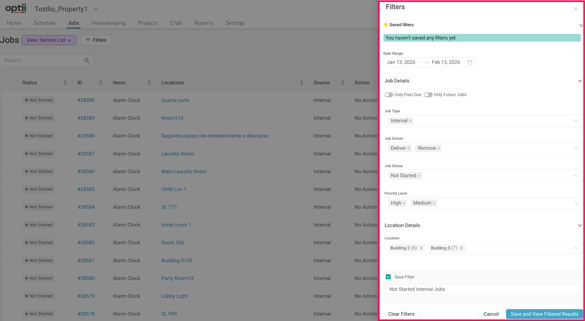
Overview - Saved Filters allow users to create and save custom filter combinations for jobs, making it easier to return to the views they use most often. Filters are tied to each user’s profile, persist across sessions, and can be applied across multiple views, helping users stay focused without repeatedly reapplying filters.
Functionality
- Profile-Based Saved Filters - Create and save multiple filter combinations directly to your user profile.
- Persistent Across Sessions - The last selected filter is retained even after logging out and back in.
- Works Across Views - Apply and switch saved filters across Status Page, My Jobs, and List View.
- Flexible Filtering Options - Filter by common job attributes such as date range, job type, action, status, priority, and location (availability may vary by view).
Benefits
- Reduces time spent repeatedly setting up the same filters.
- Enables personalized job views based on role, shift, or responsibilities.
- Helps teams quickly focus on relevant, high-priority, or upcoming work.
Custom Tags - Jobs and Job Cards
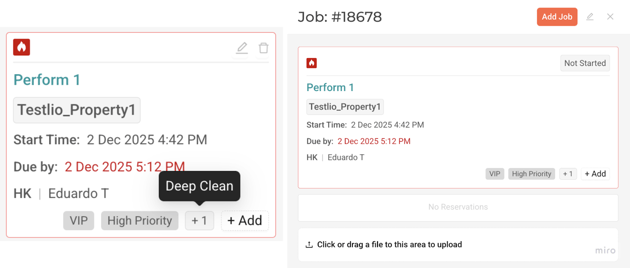
Overview - Job Card Tags make it easier to view and manage job context at a glance. Tags are now displayed directly on job cards, allowing users to quickly understand key details without opening the job. Users can also add or create tags directly from the job card at any point in the job lifecycle, eliminating the need to edit the job or navigate to tag management settings.
Functionality
- Tag Visibility on Job Cards - View assigned tags directly on job cards without opening the job.
- Add Tags Inline - Add existing tags directly from the job card.
- Create Tags on the Fly - Create new custom tags without navigating to tag management or editing the job.
- Instant Updates - Tags are immediately reflected on the job card.
Benefits
- Faster access to important job context
- Reduced clicks and simplified workflows
- Ability to add tags mid-job for categorization, escalation, or follow-up
- Improved visibility for priority and special handling