![Optii Logo 3x (2)-3.png]](https://help.optiisolutions.com/hs-fs/hubfs/Optii%20Logo%203x%20(2)-3.png?height=40&name=Optii%20Logo%203x%20(2)-3.png)
Release Notes 3.25.0, Week of March 02, 2026
We're pleased to introduce Optii 3.25.0. This release delivers meaningful improvements to housekeeping automation — including smarter logic for early departures and OOO rooms, a brand-new Housekeeping Benchmark Report, expanded room exception status support on job cards, streamlined login routing, and a number of bug fixes and performance improvements.
- Housekeeping Rules Enhancements - Early Departure Logic enhancements
- Optii now reflects the Occupancy Status and Room Status when a guest checks out ahead of their scheduled departure date
- Skip Option
- A new action that allows users to skip an inspection job directly within the workflow
- Linen Strip configuration enhancements
- Properties can now prevent a Linen Strip job from being automatically cancelled when a Room Attendant begins cleaning
- Housekeeping Benchmark Report
- A new report offering a high-level view of team performance across both Room Attendant and Inspector roles
- Additional Room Exception Status Support
- Optii now supports additional room exception statuses on job cards under Housekeeping.
- Automatic login routing based on permissions
- Optii now automatically routes users to the most relevant view upon login based on their role and permissions.
- Bugs/Enhancements
 Early Departure Logic - Enhancements
Overview
When a guest checks out earlier than their scheduled departure, Optii now ensures the room retains a Dirty status — even if it was previously recorded as Clean or Inspected. This guarantees the room is properly serviced before the next guest arrives, with no manual intervention required.
Functionality
- Housekeeping job creation follows the correct sequencing logic when an early departure is recorded
- Room status is automatically protected from being incorrectly marked as ready, preventing operational errors
Benefits
- Housekeeping workflows trigger automatically, removing the need for supervisors to manually reassign rooms
- Teams have a clear and accurate view of the housekeeping workload at all times
 Housekeeping - Skip option
Overview
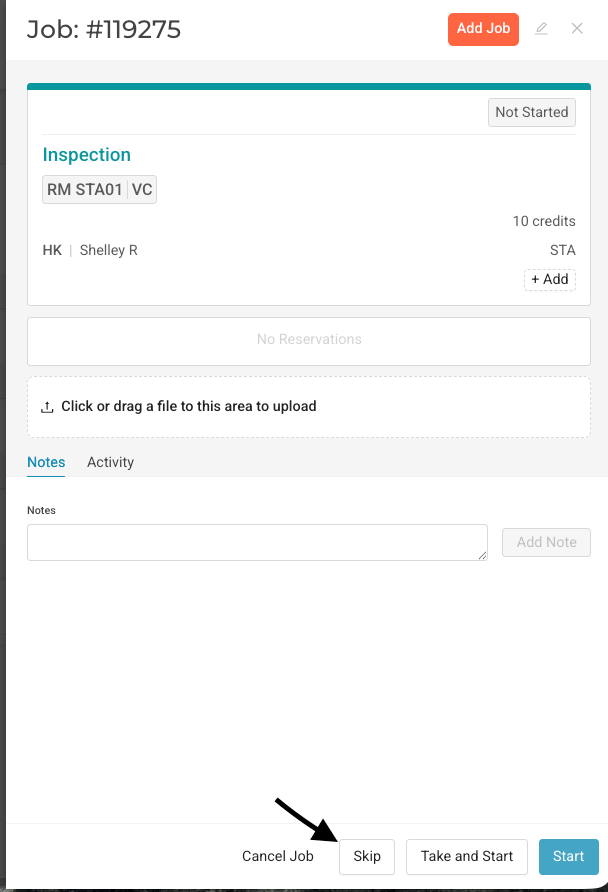
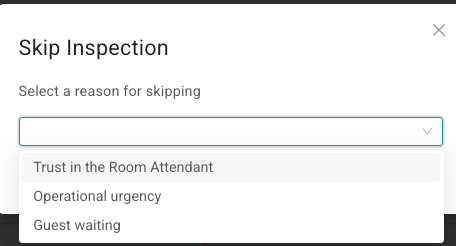
The inspection workflow now includes an optional Skip action, giving inspectors the ability to bypass an inspection when appropriate. This provides management with a more accurate record of inspections that were genuinely completed — along with a realistic view of how long they take.
Functionality
- Inspectors can select Skip within the inspection workflow rather than logging a full inspection
- Skipped inspections are tracked separately, enabling accurate reporting on both completed and skipped events
Benefits
- Gives properties the flexibility to align Optii's inspection workflow with their own standard operating procedures
- Keeps operational processes running smoothly, without sacrificing reporting accuracy or management visibility
Linen Strip Configuration Enhancements
Overview
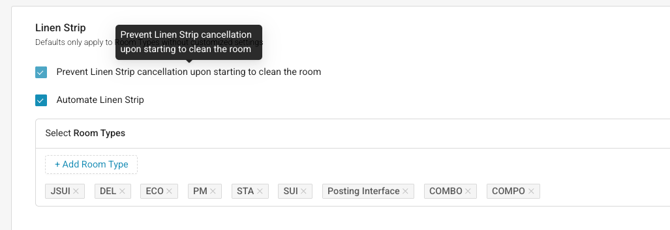
Properties can now configure whether a Linen Strip job is automatically cancelled once a Room Attendant begins cleaning. This setting puts control in the hands of each property, reflecting the fact that linen management practices vary across hotel types and brands.
Functionality
- A configuration setting allows properties to define their preferred behaviour for Linen Strip jobs
- When enabled, Linen Strip jobs are automatically cancelled upon the start of a cleaning job — no manual action needed
Benefits
- Aligns Optii's job logic with the property's own housekeeping standards, reducing unnecessary steps for the team
- Simple to configure — changes take effect immediately and require no technical knowledge
Housekeeping Benchmark Report
Overview
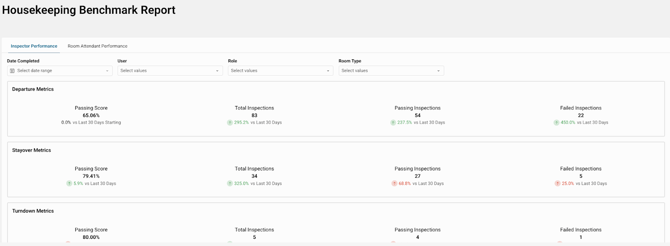
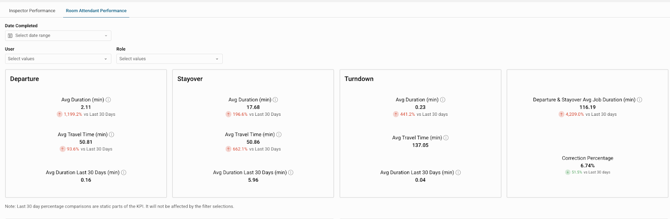
The new Housekeeping Benchmark Report gives managers a clear, consolidated view of their team's performance — covering both Room Attendants and Inspectors in a single report. No more cross-referencing multiple exports to understand how the team is tracking.
Users can filter by:
- Role
- Room Type
- User
Functionality
- Provides structured performance data for both cleaning and inspection jobs in one place
- Surfaces key metrics that would previously require downloading and manually matching several separate reports
Benefits
- Gives management a dedicated, at-a-glance view of overall team efficiency
- Easy to read and act on — designed for both daily operational use and broader performance reviews
- Reports can be scheduled for automated delivery, saving time for managers and executives alike
Automatic Login Routing Based on Permissions
Overview - Automatic Login Routing removes unnecessary navigation steps by directing users to the most relevant view as soon as they log in. Based on their role and permissions, users are taken straight to their work, whether that's My Jobs, a Dashboard, or Job Status, without needing to manually navigate after login.
Functionality
- My Jobs Auto-Routing - Users without dashboard access are automatically directed to the My Jobs view upon login.
- Dashboard Priority Routing - Users with dashboard access are routed in priority order: Service Dashboard → Housekeeping Dashboard → GM Dashboard.
- Fallback to Job Status - Users without access to any dashboard or My Jobs are automatically routed to the Job Status view.
- Works Across All Login Types - Routing logic applies to both standard and SSO logins, on Desktop and Mobile.
Benefits
- Faster time-to-first-action after login
- Eliminates unnecessary navigation for line associates like Room Attendants, Housemen, and Runners
- Login experience aligned with each user's role and daily responsibilities
- Consistent behaviour across all login methods (SSO and Traditional Login) and devices
Additional Room Exception Status Support
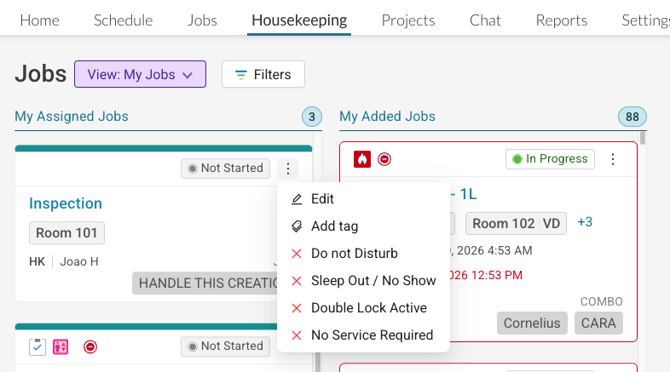
Overview - Room Exception Status Enhancement expands the available exception status options on job cards in the Housekeeping module. Users can now access and apply a fuller set of room exception statuses directly from the job card, giving both line staff and supervisors greater control over room status management.
Functionality
- Expanded Exception Statuses - Additional room exception statuses are now available from the three-dot menu on the job card.
- Double Lock Active
- No Service Required
- Inline Access - Exception statuses can be applied directly from the job card without navigating elsewhere.
- Supervisor View Support - Supervisors can view and apply room exception statuses directly from the supervisor view, keeping their workflow uninterrupted.
Benefits
- Faster room status updates for both housekeeping staff and supervisors
- Reduces operational confusion by surfacing all relevant status options in one place
- Eliminates the need to navigate away from the current view to update room exceptions
- Supervisors gain greater visibility and control over room exception statuses without switching contexts
Enhancements & Bugs
- Component Rooms
- Enhanced the ability to switch between opting for parent or child locations for “Virtual/Component” Rooms
- Cleaning History Report
- Report now support ability to view notes associated with housekeeping Jobs
- Bugs Addressed
- Fixed an intermittent issue where unassigning jobs on the Timeline would not fully unassign them
- Improved performance in the Timeline module
- Fixed an issue where job cards were not showing the most recent job note
- Fixed an issue where the Timeline was not listing team members in alphanumeric order
- Fixed an issue where tags were not displaying on job cards under My Jobs
- Fixed an issue where the Add Job modal would not open from Job Details
What if I have questions about all of this?
Your Optii Success Manager is awaiting your call — ask as many questions as you would like!
Call on:
- +1 855 398 1447 if you are located in North America, or
- +852 3008 0288 if you are located in Asia, or
- +44 20 3037 8851 if you are located in Europe, or
- +61 7 5292 5166 from Australia/New Zealand.
If you prefer to email, reach us at help@optiisolutions.com.