![Optii Logo 3x (2)-3.png]](https://help.optiisolutions.com/hs-fs/hubfs/Optii%20Logo%203x%20(2)-3.png?height=40&name=Optii%20Logo%203x%20(2)-3.png)
We're pleased to introduce Optii v3.28.0. This release is primarily focused on platform stability and reliability — making Optii faster, more dependable, and better equipped for what's coming next — while delivering targeted product improvements to job scheduling, housekeeping filtering, the Job Status view, and the mobile experience.
- Projected OOO/OOS Blocks — Smarter Handling for Occupied Rooms
- Projected OOO/OOS blocks received while a room is still occupied now stay pending until the room is vacant, preventing premature job cancellations
- Project Auto Cancel — Automatic Cleanup at Cycle End
- Projects can now be configured to automatically cancel all Not Started jobs at the end of each cycle
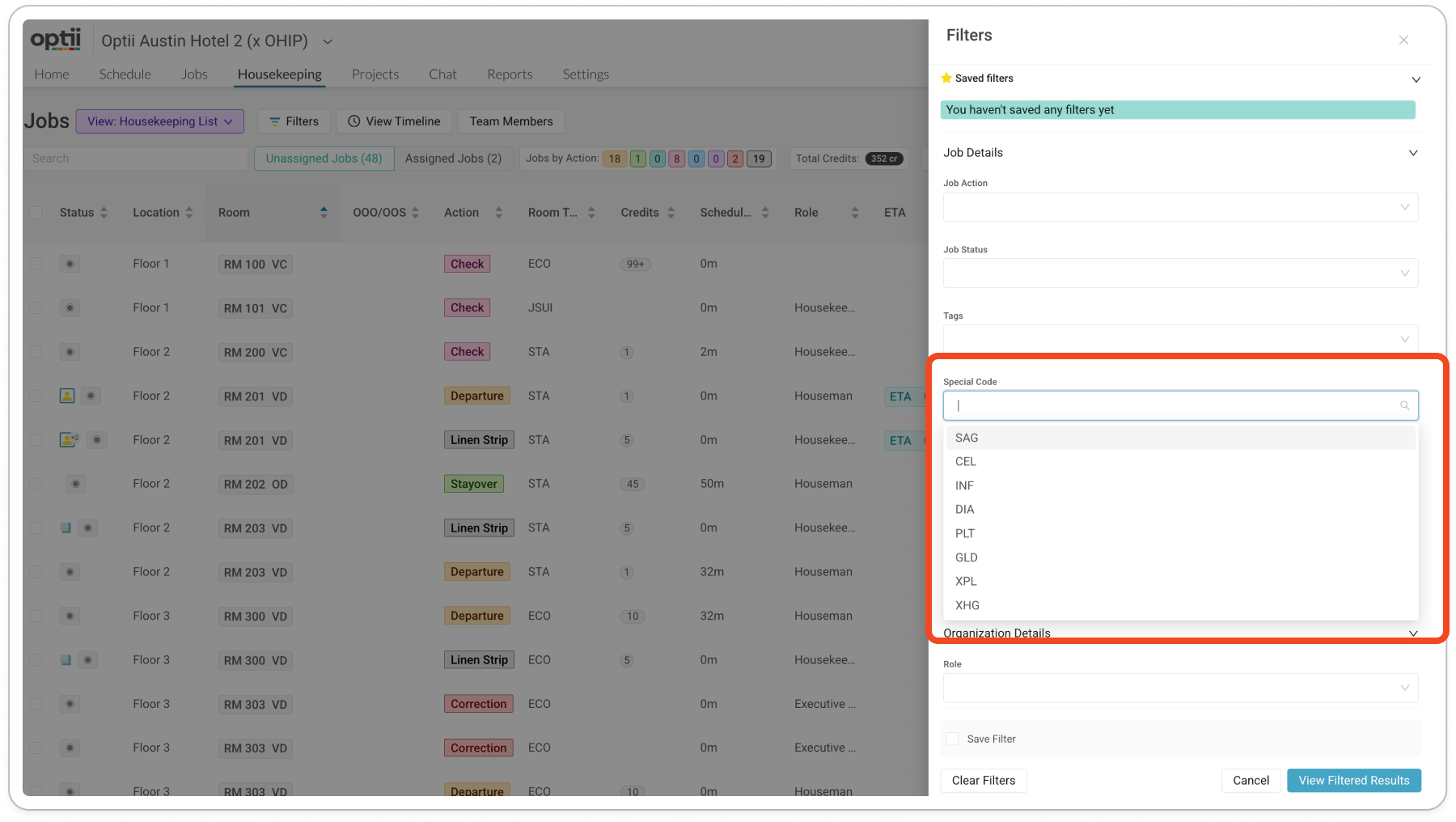
- Housekeeping List View — Special Code Filter
- Supervisors can now filter the Housekeeping view by HK special codes (e.g., VIP, DND, Rush) for faster room identification and allocation
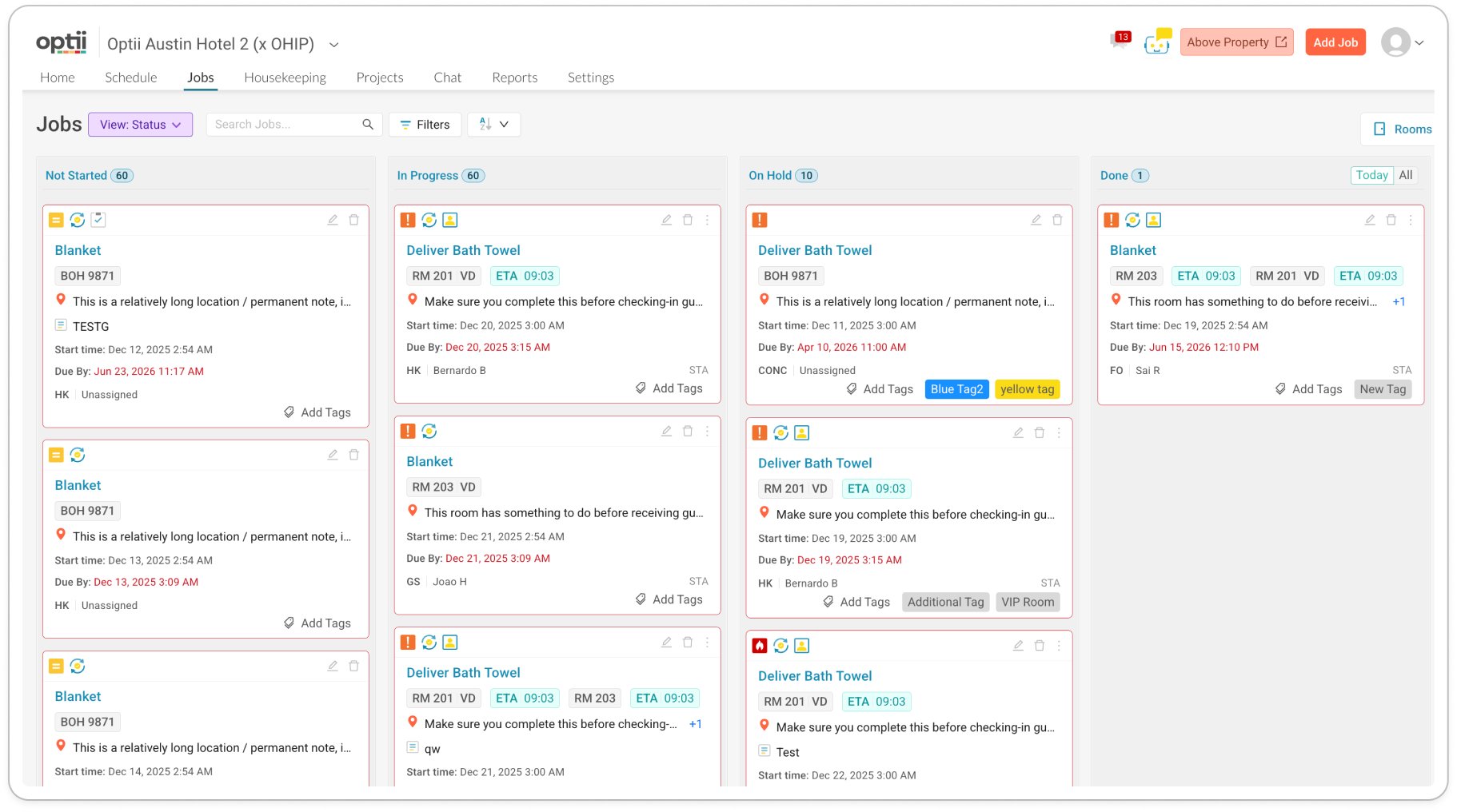
- Job Status View — Performance & UX Improvements
- Complete overhaul for better usability and seamless mobile app experience
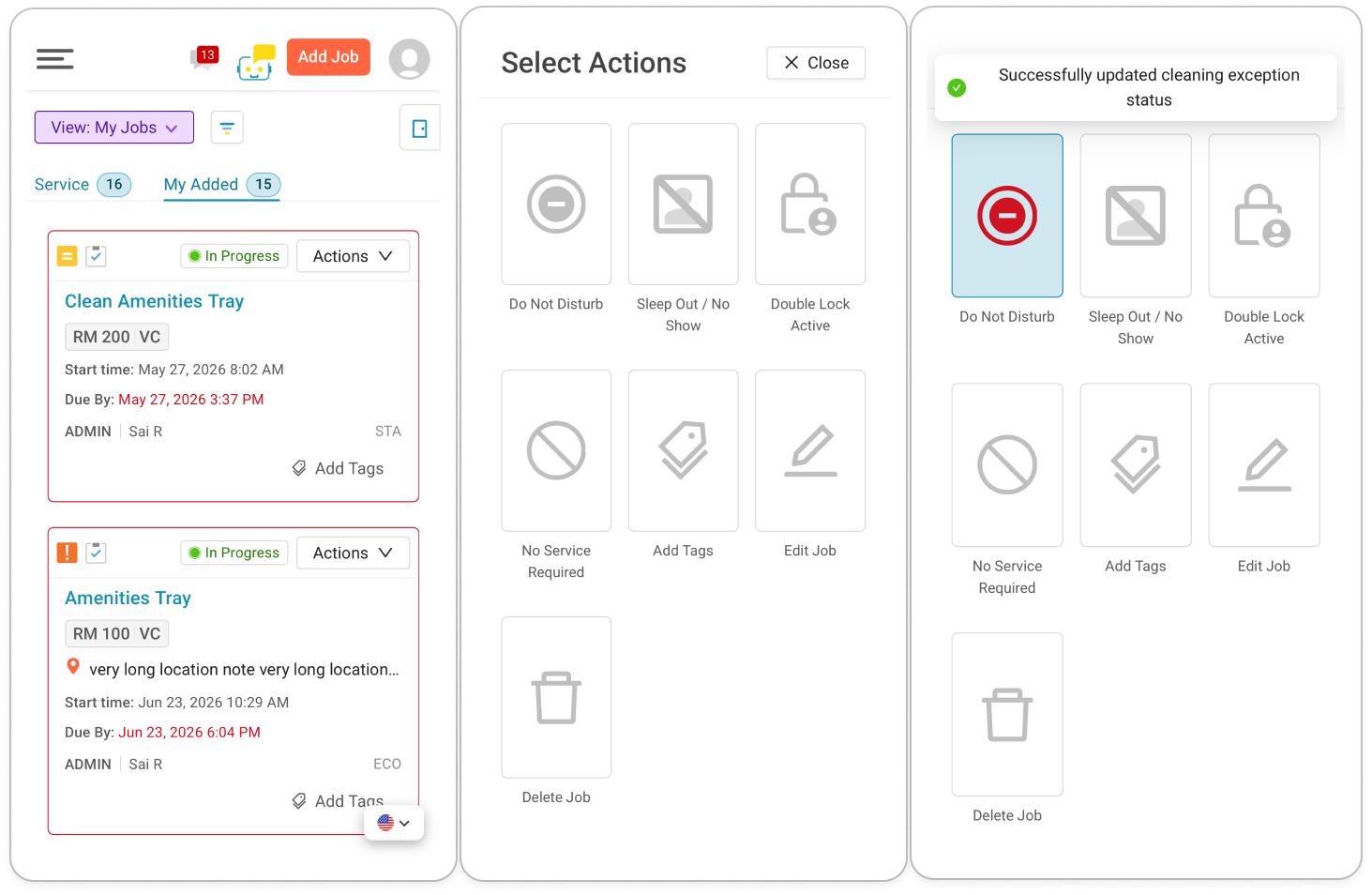
- Mobile App Improvements — Job Actions Drawer
- Job actions on mobile now surface via a bottom drawer, making it faster to act on jobs mid-shift
- Platform Reliability & Infrastructure
- Significant backend investment to improve stability, observability, and long-term maintainability.
- Enhancements & Bugs
 Projected OOO/OOS — Smarter Handling for Occupied Rooms
Overview
When the PMS sends a projected Out of Order or Out of Service block for a room that is still occupied, Optii previously processed it immediately — which could result in premature job cancellations and incorrect room-state changes while a guest was still checked in.
In this release, projected OOO/OOS blocks received for occupied rooms now remain in a pending state until the room becomes vacant, ensuring the right action happens at the right time.
Functionality
- Projected OOO/OOS blocks received while a room is occupied are now held in a pending state rather than being processed immediately
- The block is evaluated — and any applicable housekeeping changes take effect — only once the room becomes vacant
- This applies to both OOO and OOS block types received via PMS integration
- No manual intervention is required; Optii handles the transition automatically once the room clears
- Prevents premature job cancellations and incorrect room-status changes while guests are still in residence
Benefits
- Housekeeping jobs are no longer cancelled while a guest is still checked in
- Room status changes from OOO/OOS blocks reflect the actual state of the room, not a premature PMS message
- Reduces manual corrections needed when blocks arrive out of sequence from the PMS
- Gives housekeeping and front desk teams greater confidence that Optii's room states are always accurate, even when PMS messages arrive ahead of schedule
 Project Auto Cancel — Automatic Cleanup at Cycle End
Overview
Projects with recurring cycles could accumulate Not Started jobs from previous cycles, cluttering the board and requiring manual cleanup. Projects now support an Auto Cancel option: when enabled, all Not Started jobs at the end of a project cycle are automatically cancelled at 11:59 PM, keeping the board clean and preventing stale work from carrying forward.
Functionality
- A new Auto Cancel toggle is available in Project configuration
- When enabled, all Not Started jobs are automatically cancelled at 11:59 PM on the last day of each cycle (daily, weekly, monthly, or yearly)
- The setting applies to all jobs within that project regardless of who they are assigned to
- Can be enabled or disabled per project at any time without affecting jobs already in progress during the current cycle
- Cancelled jobs are recorded in the activity log for auditability
Benefits
- Eliminates stale, unfinished jobs accumulating across cycles
- Keeps the project board focused on current, active work rather than carrying over abandoned tasks
- Removes the need for manual cleanup at the end of each cycle
- Ensures reporting reflects actual completed work within each cycle, rather than inflated totals from jobs that were never actioned
Housekeeping — Special Code Filters
Overview
Supervisors can now filter the Housekeeping view by HK special codes — such as VIP, DND, or Rush — to quickly identify, group, and allocate rooms that require specific handling.
What's New
- A new Special Code filter is available in the Housekeeping view
- Supervisors can filter by one or more HK special codes simultaneously
- Compatible with all property-configured special codes — not limited to a predefined list
- Works alongside existing filters for occupancy status, clean status, and sections
- The filter persists during the session, so supervisors can work through a filtered view without needing to re-apply it
Benefits
- Faster identification of priority or flagged rooms without manually scanning the full list
- Easier allocation of staff to rooms requiring specific handling, such as VIP setups or Rush cleans
- Helps supervisors respond quickly to time-sensitive codes during peak periods like morning allocation
- Reduces the risk of missing rooms flagged for special treatment during a busy shift
Job Status View — Rebuilt for Performance & Reliability
Overview
The Job Status page is Optii's most heavily used module, and the legacy implementation had accumulated significant technical debt — performance bottlenecks, unreliable drag-and-drop, unoptimised data subscriptions, and a codebase that was difficult to maintain and extend. This release delivers a ground-up rebuild of the Job Status view, replacing the legacy architecture with a modern, performant foundation.
Functionality
- Each status column loads independently, so the board becomes usable faster and columns no longer wait on each other
- Dragging and dropping jobs between status lanes is now smooth and reliable
- Job status and source filters work correctly, allowing teams to narrow the board to what's relevant
- The Job Status view is now fully supported on mobile
Benefits
- Faster page load and smoother scrolling, even at high job volumes
- Reliable drag-and-drop between status lanes with no unexpected behaviour
- Accurate job counts per column on load
- Sorting and filtering that behave predictably within each status lane
- A fully usable Job Status view on mobile for supervisors managing operations from the floor
Mobile — Job Actions Drawer
Overview
On mobile, accessing job actions — such as placing a room on Do Not Disturb, No Service Required, or other statuses — previously required navigating away from the current workflow. Job actions now open via a bottom drawer when tapping the Actions button, keeping room attendants in context while they work.
Functionality
- Tapping the Actions button on a job now opens a bottom drawer on mobile rather than navigating to a separate screen
- All available job actions — including DND, NSR, and other configurable statuses — are presented inline within the drawer
- The drawer opens in context, without navigating away from the current job or job list view
- Actions within the drawer behave identically to their desktop equivalents
Benefits
- Fewer taps to place rooms on DND, NSR, or other statuses, streamlining one of the most common mobile actions for room attendants
- Attendants stay in context while acting on jobs mid-shift, without losing their place in the job list
- Reduces the risk of accidental navigation away from the current workflow on smaller screens
- Consistent with standard mobile UI patterns, making the interaction feel familiar and intuitive
Other Enhancements & Performance Improvements
- A more reliable Optii - This release included significant work under the hood to make Optii more stable and consistent day-to-day. Room statuses stay accurate, PMS updates come through as expected, and the disruptions that could cause jobs or data to go missing have been addressed. When issues do arise, our team can now identify and resolve them faster than before.
Bugs
- Stayover jobs were being automatically cancelled shortly after creation
- Duplicate departure jobs were being created for the same room
- A Turndown job was being created for rooms with no associated reservation details
- Checklist tasks were appearing in a scrambled order; photo uploads were resetting task order
- The OOS "Departure clean on last day" setting was not persisting after save
- Repeating Job templates were appearing blank when opened for editing
- Auto-assignment rules were crashing in certain property configurations
- Auto-assign inspections were not triggering for certain supervisor configurations
- Timeline creation was returning an error for certain properties
- The HK Job Assignments Report was showing incorrect counts
- Opera Hosted Out of Order reasons were not displaying in Optii
- Certain PMS Vacant/Dirty messages were not being received for specific rooms
- Room reservation details in the rooms drawer were displaying as "#" in some configurations
- Jobs could not be edited without the "View all jobs by status" permission enabled
- Activity logs were appearing empty in the room drawer
- Previous day completed jobs were reappearing in the daily roster
- The HK department was not auto-populating when manually adding a job
- Room attendants were appearing duplicated on the timeline view
- The Team Member Activity Report was timing out on large data sets
What if I have questions about all of this?
Your Optii Success Manager is awaiting your call — ask as many questions as you would like!
Call on:
- +1 855 398 1447 if you are located in North America, or
- +852 3008 0288 if you are located in Asia, or
- +44 20 3037 8851 if you are located in Europe, or
- +61 7 5292 5166 from Australia/New Zealand.
If you prefer to email, reach us at help@optiisolutions.com.