![Optii Logo 3x (2)-3.png]](https://help.optiisolutions.com/hs-fs/hubfs/Optii%20Logo%203x%20(2)-3.png?height=40&name=Optii%20Logo%203x%20(2)-3.png)
Optii now allows you to skip multiple inspections in bulk, making it easier to manage your inspection workload when your team cannot complete all scheduled inspections in a single day.
Instead of skipping inspections individually, you can use the Bulk Skip Inspection feature to process multiple inspections at once, helping your team save time and keep daily operations organized.
When Should You Use Bulk Skip Inspection?
Bulk Skip Inspection is useful when your team is unable to complete all scheduled inspections within the day.
For example:
- Your property is experiencing high occupancy or an unusually busy day.
- Staffing limitations prevent your team from completing every scheduled inspection.
- Operational priorities require your team to focus on other housekeeping responsibilities.
- Multiple inspections remain outstanding at the end of the day.
Using this feature helps your team manage outstanding inspections more efficiently when completing them all is not possible.
How to Skip Inspections in Bulk
- Within the Housekeeping List view, Select all Inspections or Checks you wish to skip
- In the menu bar at the bottom of the view, Select Job Actions.
- Select "Skip Inspections"
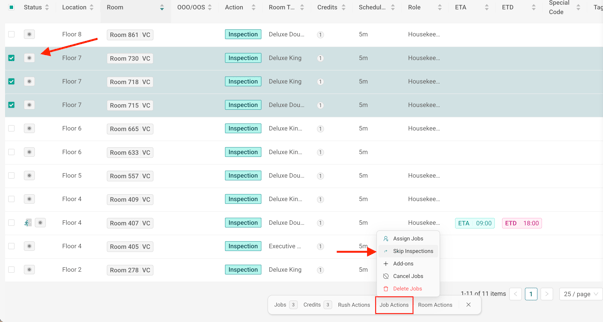
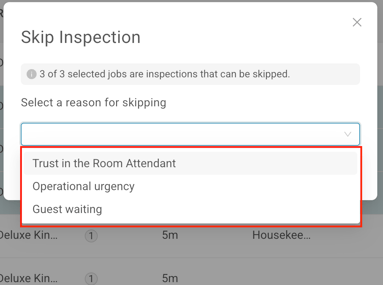
- A Skip Inspections Menu will appear, where you will select the reason for skipping the inspections.
- Trust in Room Attendant
- Operational Urgency
- Guest Waiting
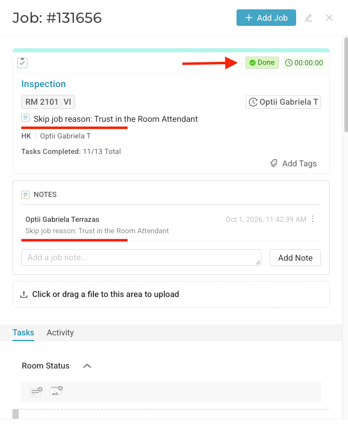
- Each skipped room will automatically move to Vacant Inspected (VI) if vacant or Occupied Inspected (OI) if occupied. The associated Inspection or Check task will be marked as completed, with a note documenting that the inspection was skipped and the corresponding reason.
The Bulk Skip Inspection feature helps housekeeping teams save time when they cannot complete all scheduled inspections in a single day. By selecting multiple inspections and skipping them in one action, your team can manage its workload more efficiently while maintaining visibility into daily inspection activity.
💡Tip: Feel free to share this valuable resource with your colleagues to explore Optii.
Would you like to learn more?
If you would like to learn more about Optii, please check out our Optii learning centre today at help.optiisolutions.com
Have questions or need help?
Do you have any questions about Optii? Please contact your success manager today at help@optiisolutions.com