![Optii Logo 3x (2)-3.png]](https://help.optiisolutions.com/hs-fs/hubfs/Optii%20Logo%203x%20(2)-3.png?height=40&name=Optii%20Logo%203x%20(2)-3.png)
Available with any of the following subscriptions:
- Service
- Housekeeping
- Projects (Preventative Maintenance)
- Guest Messaging
- Above Property Management
- PMS Integration with Optii Platform
The Optii PMS Integration connects your Property Management System directly to Optii, giving your team real-time access to room status and guest reservation details inside Optii Service and Projects, with Housekeeping support now available. This eliminates the need to switch between systems and enables faster, more personalised guest service.
⚠️ If a PMS Integration is available with our Optii Platform with any of the above subscriptions Optii will receive the guest reservation details directly within our system.
This real-time data with your PMS will empower your team to:
- Prioritize tasks effectively: By knowing the occupancy status and guest arrival/departure times, you can prioritize urgent requests and optimize your workflow.
- Provide personalized service: Accessing guest details and VIP status allows you to tailor your interactions and enhance the guest experience.
- Improve communication: Real-time updates ensure everyone is on the same page, minimizing delays and misunderstandings.
- Increase efficiency: Having all necessary information at your fingertips reduces the need for time-consuming inquiries and lookups.
How do I access reservation details?
Once the PMS integration is set up, viewing reservation details is straightforward:
- Locate the Room: Simply click on the specific room number you wish to review.
- View Reservation Details: If the room has an associated reservation (arrival, in-house, or departure), Optii will display the relevant information directly on your screen.
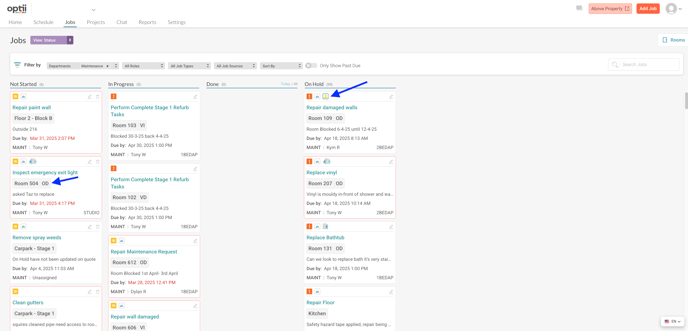
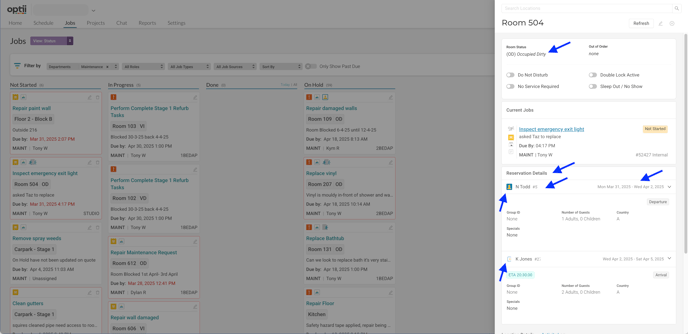
Understanding the Reservation Details:
The following information will be displayed for each reservation:
-
Guest Information:
- Title: Displayed as Mr., Ms., Mrs., Miss, Mx., etc., as recorded in your PMS.
- Name: Guest's first name.
- Last Name: Guest's last name.
-
Reservation Details:
- Reservation ID: A unique identifier for each booking. This is crucial for referencing specific reservations.
- Check-in Date: The guest's scheduled arrival date.
- Check-out Date: The guest's scheduled departure date.
- ETA (Estimated Time of Arrival): If provided, the guest's anticipated arrival time. This helps with planning and preparation.
- ETD (Estimated Time of Departure): If provided, the guest's departure time. This helps with planning and preparation.
-
Status and Grouping:
- In-House Label: This label will indicate if the guest is currently checked in (e.g., "In-House means "Checked In"). This provides a quick view of the guest's current status.
- Arrival Label: This label will indicate if the guest is currently checked in (e.g., "Arrival means the room has an active reservation for arrival today). This provides a quick view of the guest's current status.
-
- Group ID: If the reservation is part of a group booking, this ID will link all related reservations together. This simplifies managing group arrivals and departures.
-
Occupancy Details:
- Number of Guests: The total number of guests included in the reservation.
- Adults: The number of adult guests.
- Children: The number of children included in the reservation.
-
Special Considerations:
- VIP Codes: Any VIP codes associated with the guest (e.g., "VIP1," "VIP Gold") will be displayed. This allows your team to recognize and cater to VIP guests appropriately.
- Traces: Any special requests, notes, or instructions related to the reservation will be displayed as "Traces." These might include requests for specific room types, amenities, or services.
- PMS Notes: Any internal notes added to the reservation within your PMS will be visible here. This ensures seamless communication between teams.
- Special Codes: These codes may represent specific packages, promotions, or other relevant information associated with the booking.
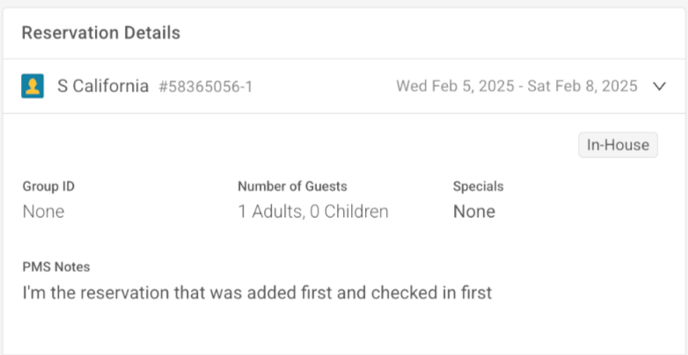
"In-House" Reservation Details
When a guest is currently checked in, Optii displays the In-House label on the room. The reservation details panel shows all fields listed above, including the guest's name, Reservation ID, check-in and check-out dates, VIP codes, Traces, and PMS Notes. Use this view to confirm current occupancy and respond to in-stay service requests.
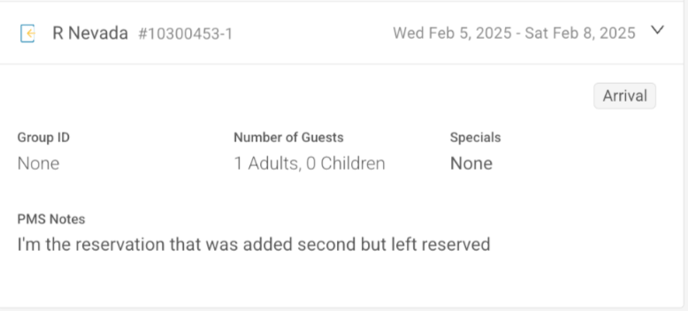
"Arrival" Reservation Details
When a room has an active reservation with an arrival scheduled for today, Optii displays the Arrival label on the room. The reservation details panel shows the guest's name, Reservation ID, ETA, check-in and check-out dates, VIP codes, Traces, and PMS Notes. Use this view to prepare the room and anticipate the guest's needs before they arrive.
Benefits of Integration:
The PMS integrations with Optii offers several key advantages:
- Centralized Information: Access all essential reservation details in one place, eliminating the need to switch between systems.
- Improved Efficiency: Streamline your workflows and save time by having real-time access to guest information.
- Enhanced Guest Experience: Personalize guest interactions and provide better service by having a comprehensive view of their preferences and needs.
- Reduced Errors: Minimize manual data entry and reduce the risk of errors.
Would you like to learn more?
Have questions or need help?